



Logs and revert
Editrix, Logs & History lists every replace and every search. A replace shows its status: success, partial or reverted. Searches appear with the type search and their number of matches. They changed nothing and cannot be reverted.
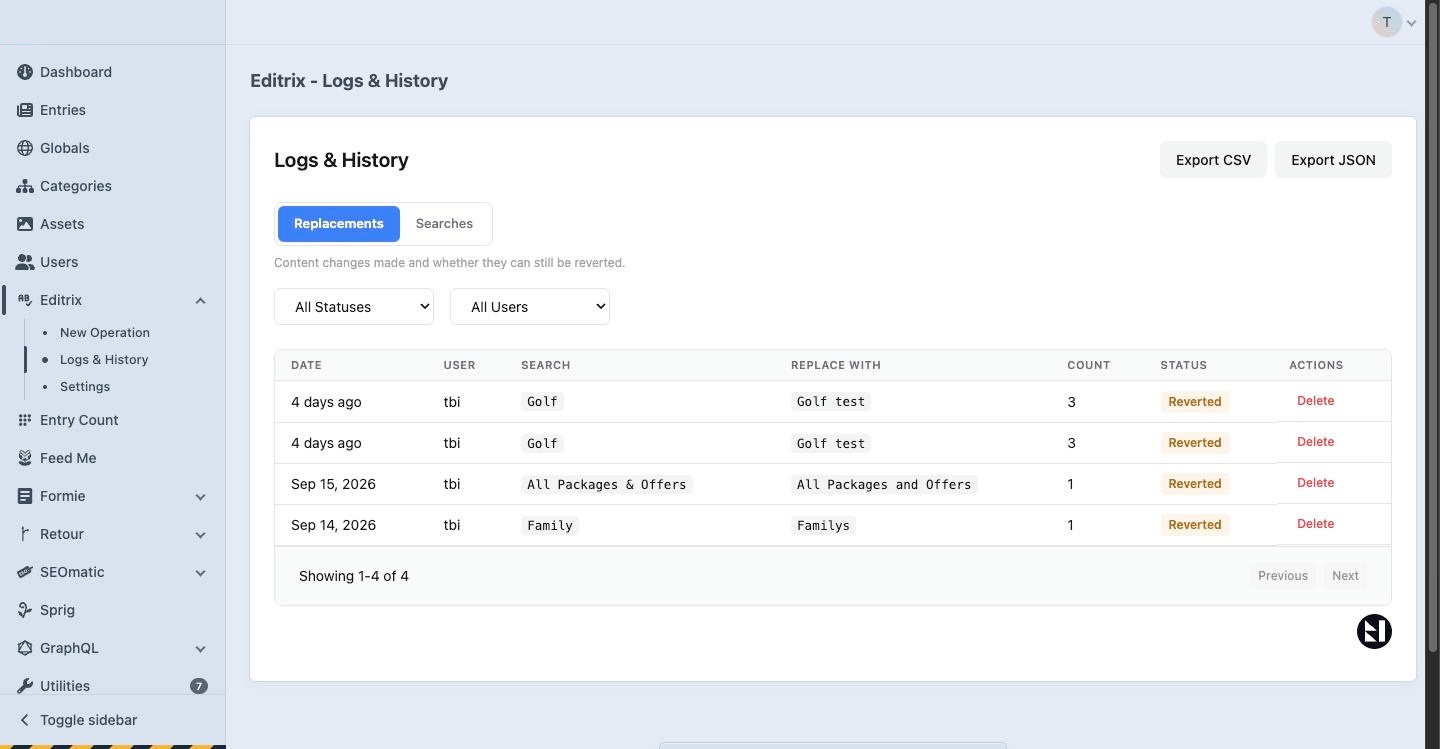
How a replace is logged
Every value is written to the log before its entry is saved. A replace that is cancelled, interrupted or killed by the server can therefore still be reverted, up to the values that were saved.
Replaces and reverts are also written to storage/logs/editrix-*.log, with which entries were changed and by whom. That file survives restoring a database backup.
Revert
Open an operation and choose Revert. Editrix puts the values back one at a time:
- A value that was edited after the replace is not overwritten. Those values are left as they are and reported.
- After a revert, you can choose to overwrite those edited values on purpose.
- Reverting twice, or reverting after an interrupted replace, is safe.
A revert also follows Craft's permissions: a value in an entry the user may not save is left as it is and reported as failed. Each value it restores leaves a revision noted "Editrix revert of #12".
A revert of many values runs in the queue, with progress.
A revert only works while the log exists. Logs are kept for the number of days in the Log Retention setting, up to 30 days on Standard and 90 on Pro.
Export (Pro)
Logs can be exported as CSV or JSON, and search results as CSV. Exporting needs the Export logs permission.
Deleting logs
Users with the Delete logs permission can delete a log. A deleted log can no longer be reverted.